Sales and marketing,
on infrastructure we run for you.
Find the company, email the buyer, sign the contract, get paid — on one record that never gets re-keyed. The sending servers and the prospect data come with it, at the price on the box. AI drafting runs on your own model key, at no markup, and you can bring your own SMTP or enrichment too.
Managed SMTP · verified prospect data · your own domain · your own model key
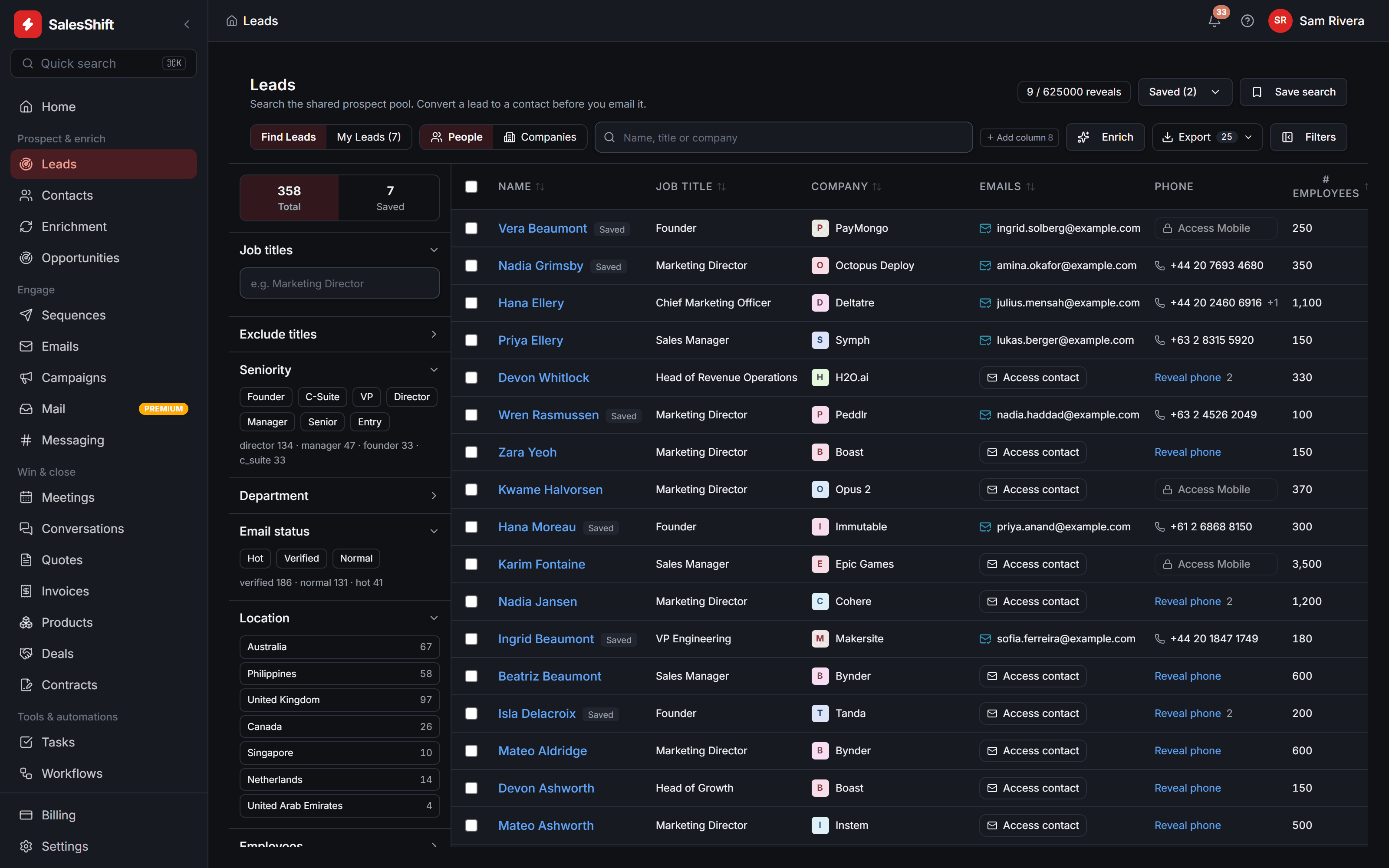
Find the company before you know the person
A shared pool of companies and people, filtered by seniority, department, country, headcount and whether an address is confirmed. Every facet carries its own count, so you can see the size of a segment before you commit to it.
Click a stage, or use the arrow keys. Captured from the running application. On a narrow screen each stage shows a region of its capture rather than the whole screen, so the interface stays readable.
What the product actually talks to
Sending and prospect data are provisioned with the plan; swapping either for your own account is a field in settings, and we take no margin when you do. The three model providers are the other way round — those you connect, on every plan. Gmail and Outlook connect over OAuth too — see the last question below for exactly how far that one is proven.
The whole argument
Four tools that don't speak to each other, replaced by one that does.
The prospect you found, the sequence that reached them, the meeting it booked, the contract they signed and the invoice they paid are the same row in the same system. Nothing is re-keyed, and nothing quietly disagrees.
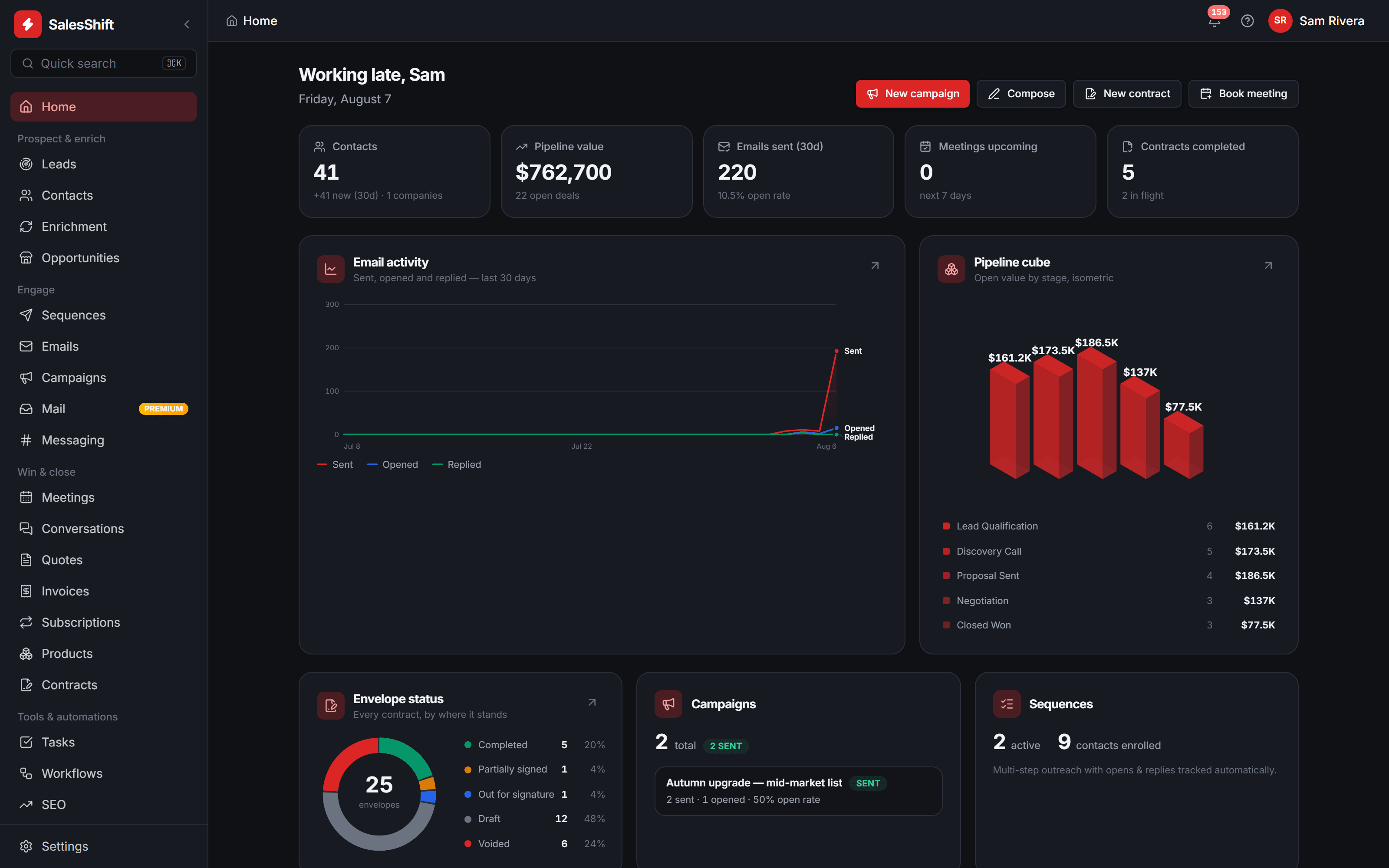
The home dashboard of a demo workspace. Every figure on it was computed by the product from that workspace's own data — they are not customer results, and they move between captures. On a narrow screen this is a region of that capture, not the whole screen.
One record
First search to signed invoice, without an export in the middle.
Your domain
Connect your own mailbox and mail is signed by your domain — or send over our managed relay instead.
One bill
Servers, sending and prospect data in the plan price. Nothing to assemble.
The platform
Everything a deal touches, in one place.
Not a suite of adjacent apps sharing a logo. One data model, one inbox, one audit trail — and one bill, from the company that runs the infrastructure underneath it.
Every photograph below is a region of a real capture, at detail scale. The one drawing is labelled as a drawing.
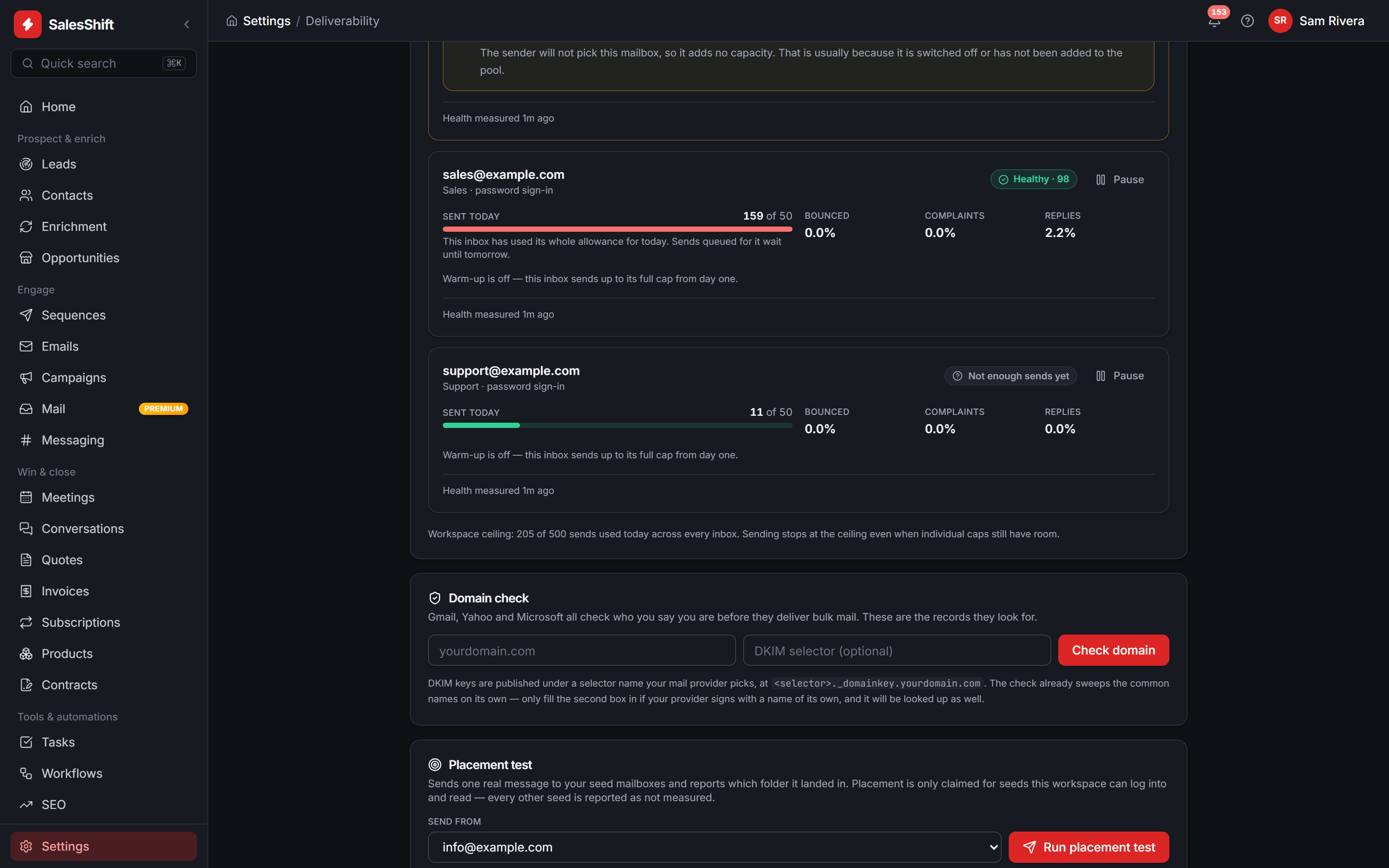
A sending pool that is graded, not guessed
Every connected mailbox carries its own health score, daily cap and bounce, complaint and reply rates. Go past the cap and the queue waits for tomorrow instead of burning the domain.
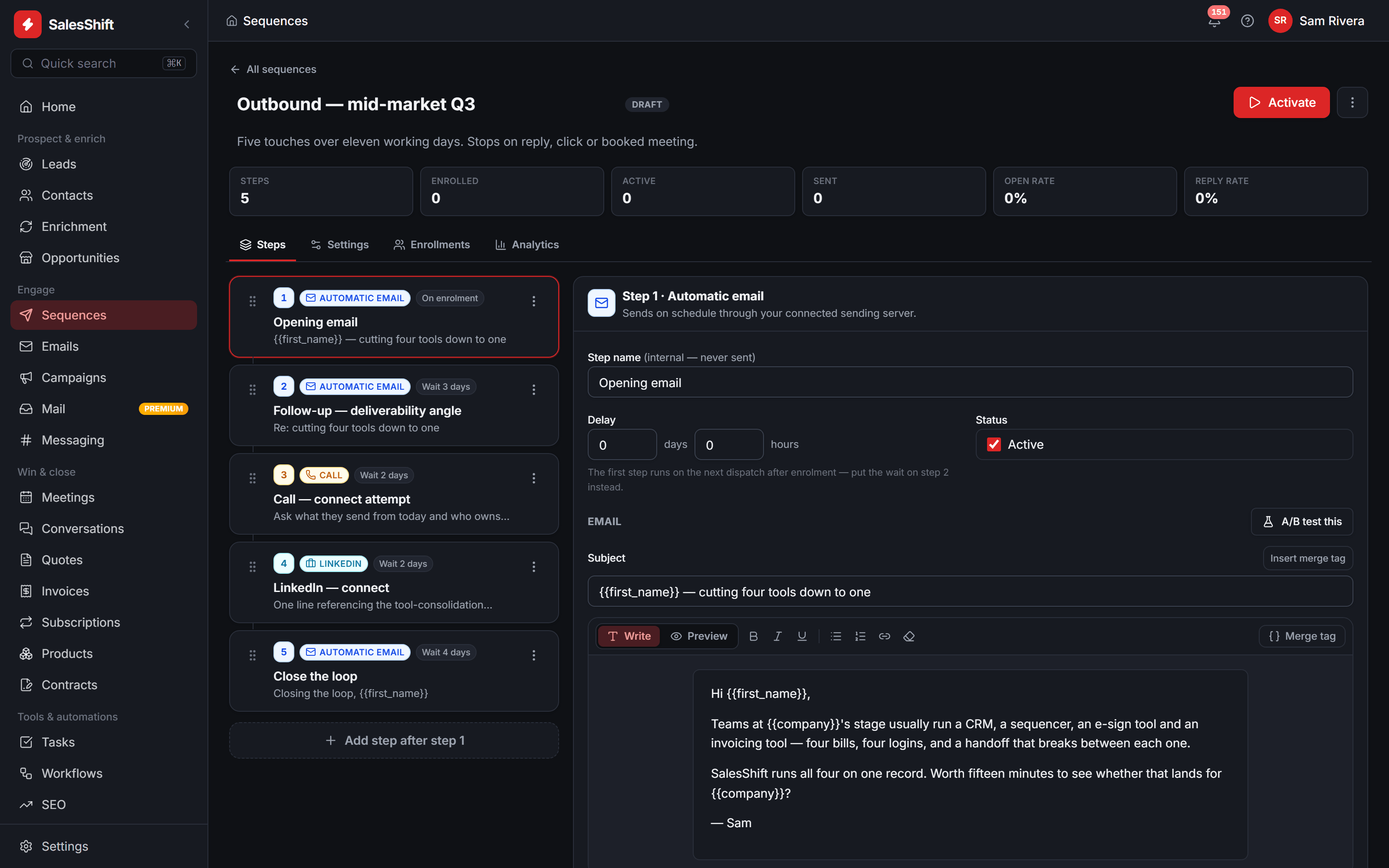
Cadences with real waits
Email, call and LinkedIn steps with explicit waits, merge tags and per-step A/B variants.
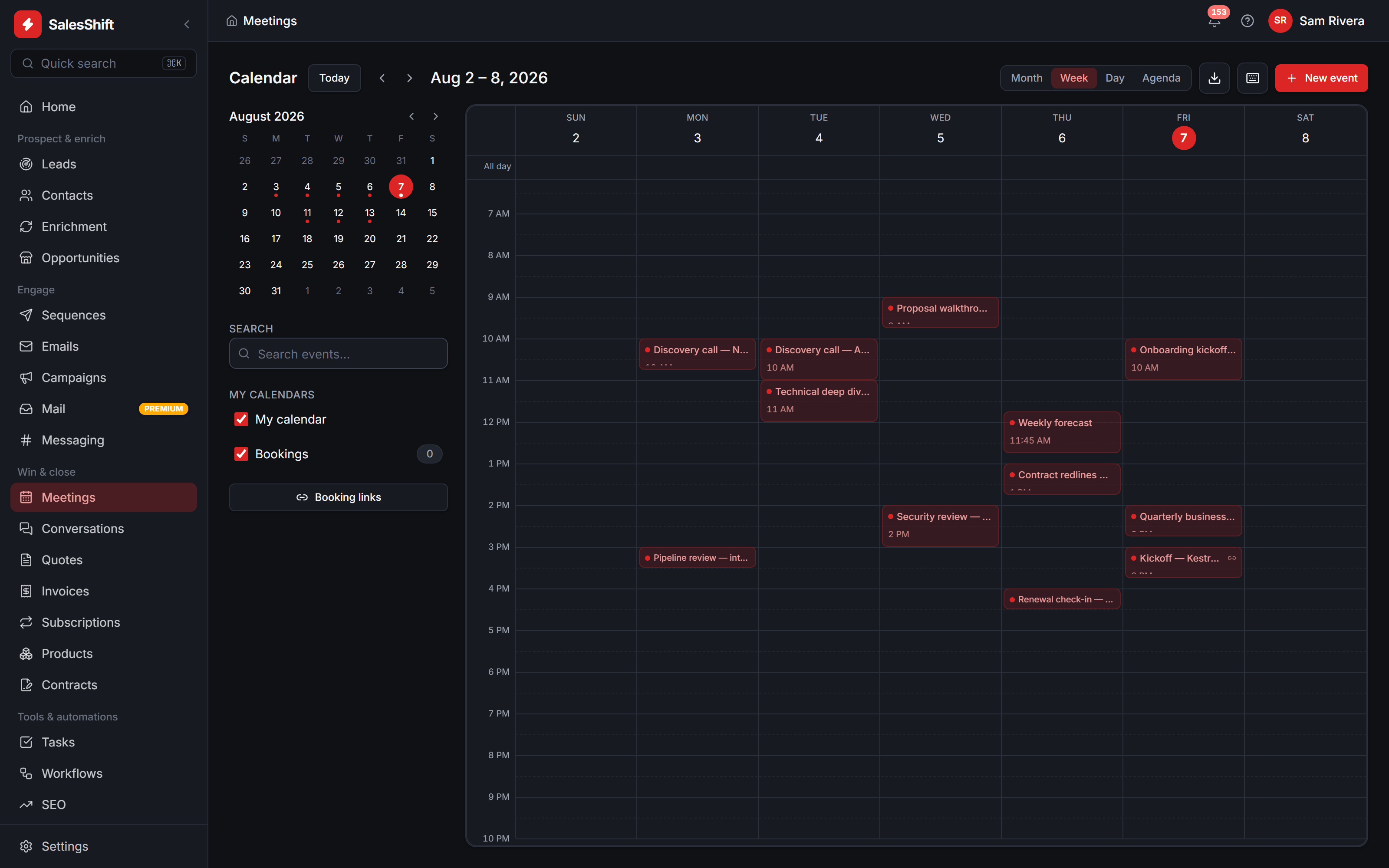
Invitations, not links
Meetings arrive as genuine ICS invitations, so accept and decline come back to the record.
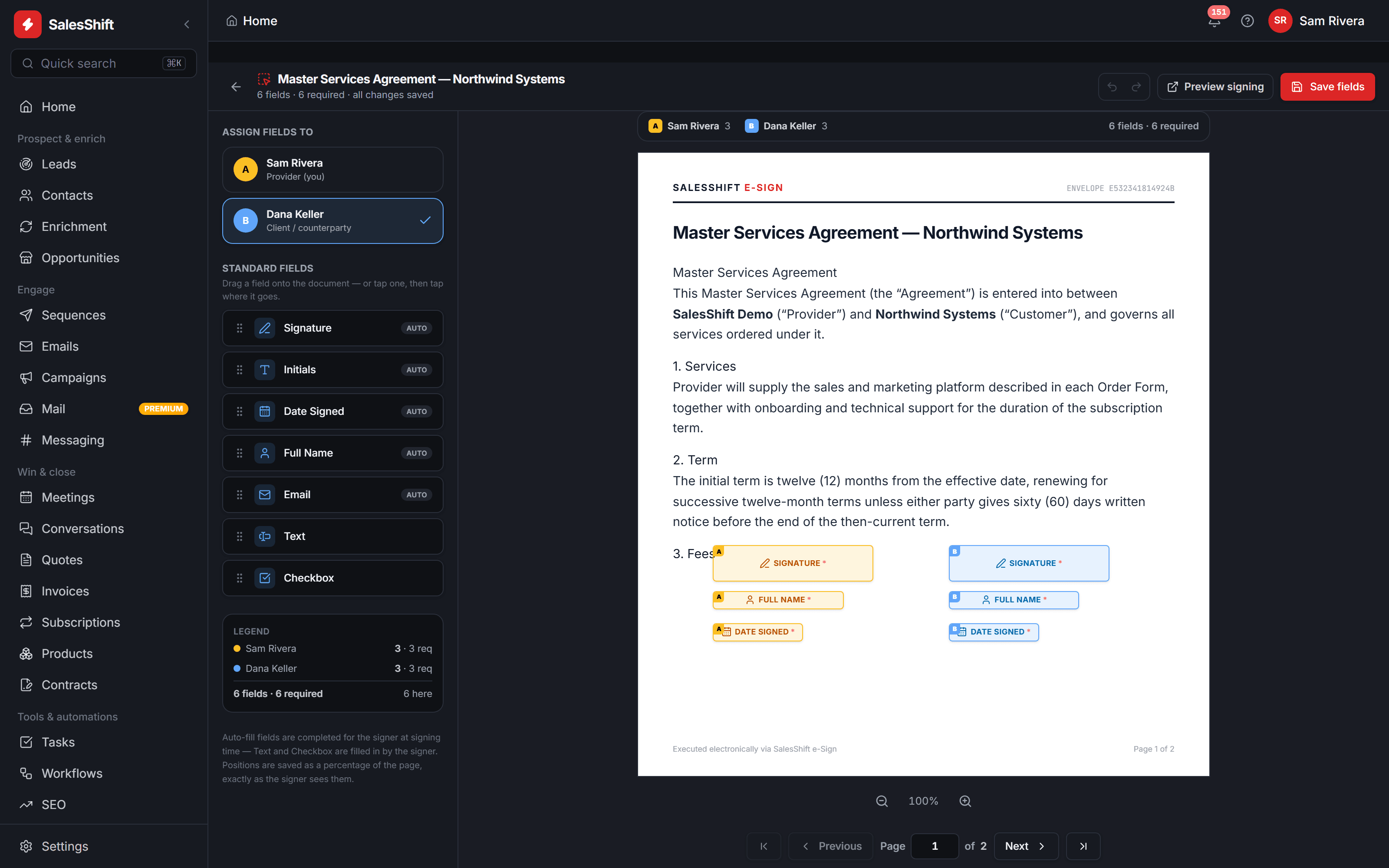
Signature fields where you drop them
One colour per signer. Positions are stored as a percentage of the page, not as pixels.
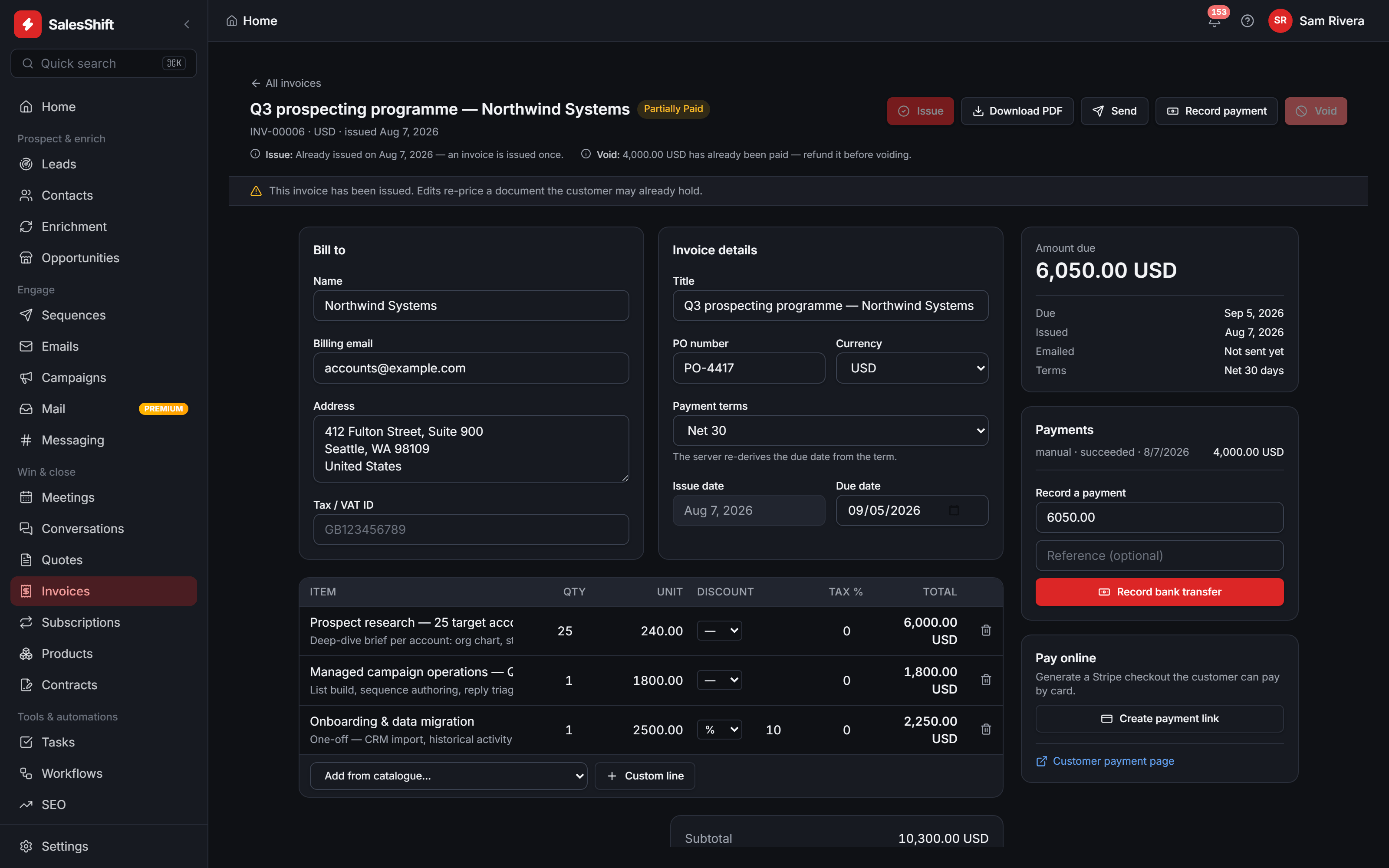
Invoices that close themselves out
Line-item discounts and tax, a PDF you send from the record, and partial payments booked against the balance until it clears.
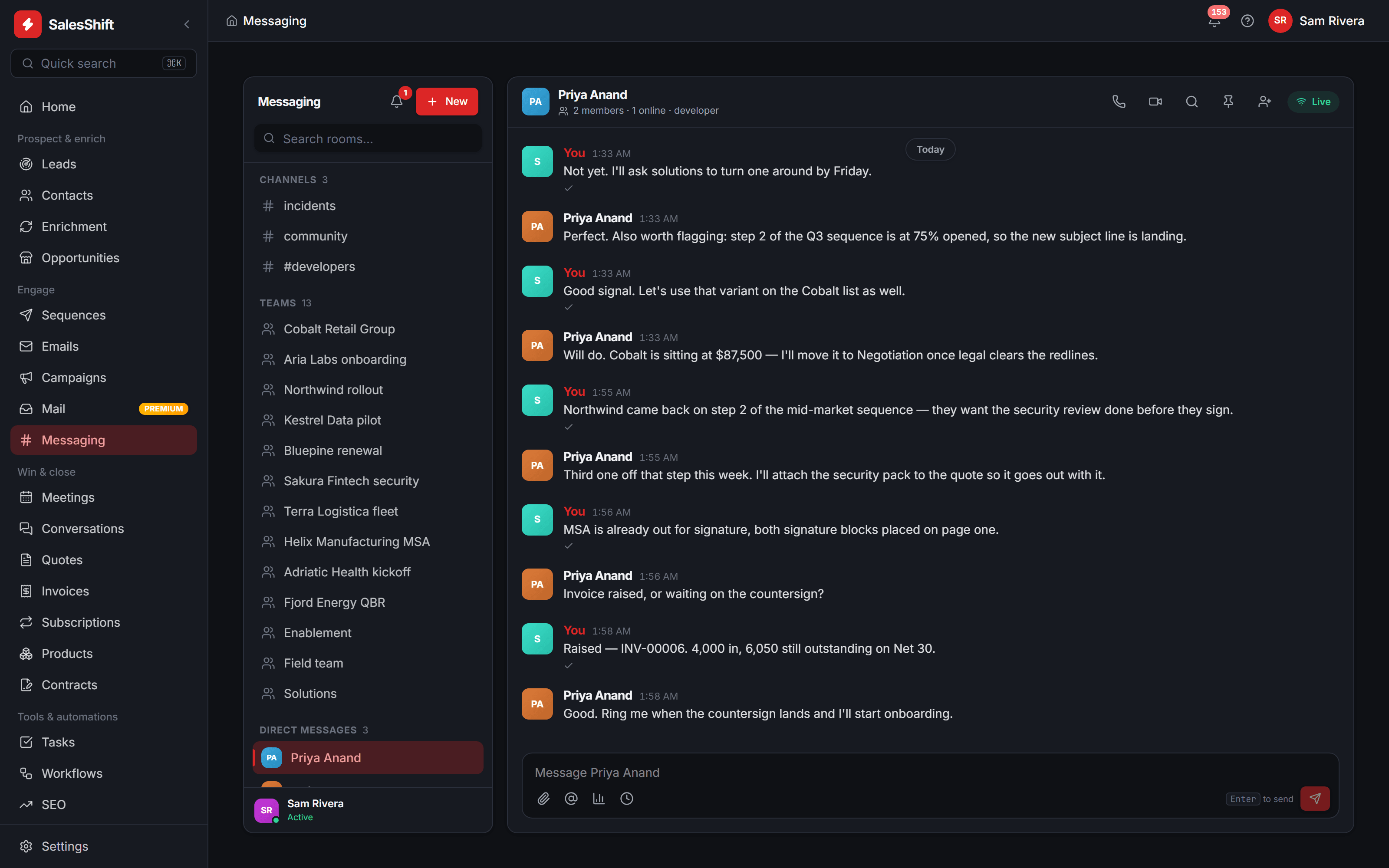
The inbox beside the room
Channels, team rooms and direct messages next to the mail client, with read receipts, scheduled sends and audio or video calls from the room header.
A workflow engine that means it
Branch, wait, re-join. Independent branches execute at the same time in a Go runtime rather than queuing behind one another.
Prospecting is the one surface not pictured here
It is in the product — Leads, Enrichment and Opportunities sit in the sidebar of every full screen shown above. Search the shared pool, reveal only the records you need, and convert them straight into contacts.
Two different things, priced two different ways. Revealing a pooled record spends a monthly allowance included with the workspace, and stops when the allowance is gone. Enriching a record — crawling a domain, verifying an address — runs on the provider key you supply, so that provider bills you directly at their price.
Hunter.io
email discovery and verification
Domain crawl
public company pages, fetched and parsed
Your account
the provider invoices you, not us
Privacy
We run the infrastructure. You keep the data.
Being the provider is what lets us answer this question at all. The servers and the sending relay are VxCloud's, so there is no third party in the mail path we would have to speak for — and your pipeline, your threads and your customers' details are yours, in a workspace nothing else reads.
Where a model is involved the answer is shorter still: the key is yours, so the account the text reaches is one you opened and can revoke. Nothing you write, send or store is used to train anything by us. Credentials live in Vault rather than the database, and the rest of the stack has the same escape hatch — your SMTP, your enrichment provider, or a dedicated node of your own.
- Your data is never training data, ours or anyone else's
- Connect your own mailbox and mail is signed by your domain
- Credentials encrypted in Vault, never written to the database
- AI runs on your own model key — no markup, and none of it stored by us
- Local models supported — nothing has to leave your network
- Export everything, any time, and take the domain with you
Sending
Managed SMTP · IMAP · SendGrid · Mailgun
Our relay, or the mailbox you connect — graded and capped either way
Prospect data
Pool search · verification · domain crawl · Hunter.io
Revealed records are copied into your workspace only
AI
Included · metered in credits
Nothing to configure — we store neither the prompt nor the output, and neither is training data
Invoicing
Quotes · contracts · invoice PDFs · recorded payments
Issued, emailed and reconciled here; card collection is not connectable yet
Diagram — not a screenshot. The real screen is Settings → BYOK Integrations.
Documentation
No logo wall. The docs are the proof.
There are no customer names, testimonials or uptime figures on this page, because we have not earned them yet. What there is instead is a reference generated from the running API — and it tells you, operation by operation, how well we actually know the thing works.
- 379
- API operations
- 302
- paths
- 28
- modules
- 116
- schemas
Counted from the inventory generated 13 August 2026. Clients: Go · Python · TypeScript · C++ · Java.
curl -s https://api.vxcloud.io/api/v1/salesshift/stats \
  -H "Authorization: Bearer $SALESSHIFT_TOKEN"
Generated from the source, not from memory
Routes, parameters and schemas come from the framework's own route objects. Error responses come from walking the handlers for every exception they can raise. If something is not in the generated inventory, it is not documented — which is why nothing in the reference describes an endpoint that does not exist.
Every operation says how well we know it
Each one carries a marker — demonstrated, partial, or undemonstrated — plus the basis for it: called live during the inventory run, verified earlier in the session, or read in source and never executed. Undemonstrated is not the same as broken, and the docs are not allowed to blur the two.
Generated, not written
The reference is produced from the running application rather than maintained by hand, so it cannot drift from the code the way a written page does. Every endpoint arrives with its real request and response shape, and the marker beside it is set by what the inventory run actually observed — which is why the counts above are read at build time instead of typed in.
Free on every plan
Public buying signals, free to read on every plan.
One pool of public hiring, funding and services signals, searched by every workspace. Reading it is not metered anywhere: the service behind the feed carries no plan check, no allowance and nothing that can answer payment required — during the free trial exactly as on a paid plan.
What the rest of it costs
- Reveals. Unmasking a person in the prospect pool draws on a monthly allowance — 5,000 a month on the free plan, up to 100,000 on Organization.
- Sending. Connect your own mailbox on any plan, including the free one. A paid plan adds our managed relay and the reputation behind it.
Find the signal
Companies say what they are about to buy in public — the role they posted, the contract they put out, the round they closed. Those posts are collected into one pool every workspace searches: what the signal is, what it implies, which source it came from, and whether an address came with it. Filter by source, search by company, title or skill, and put the contactable ones first.
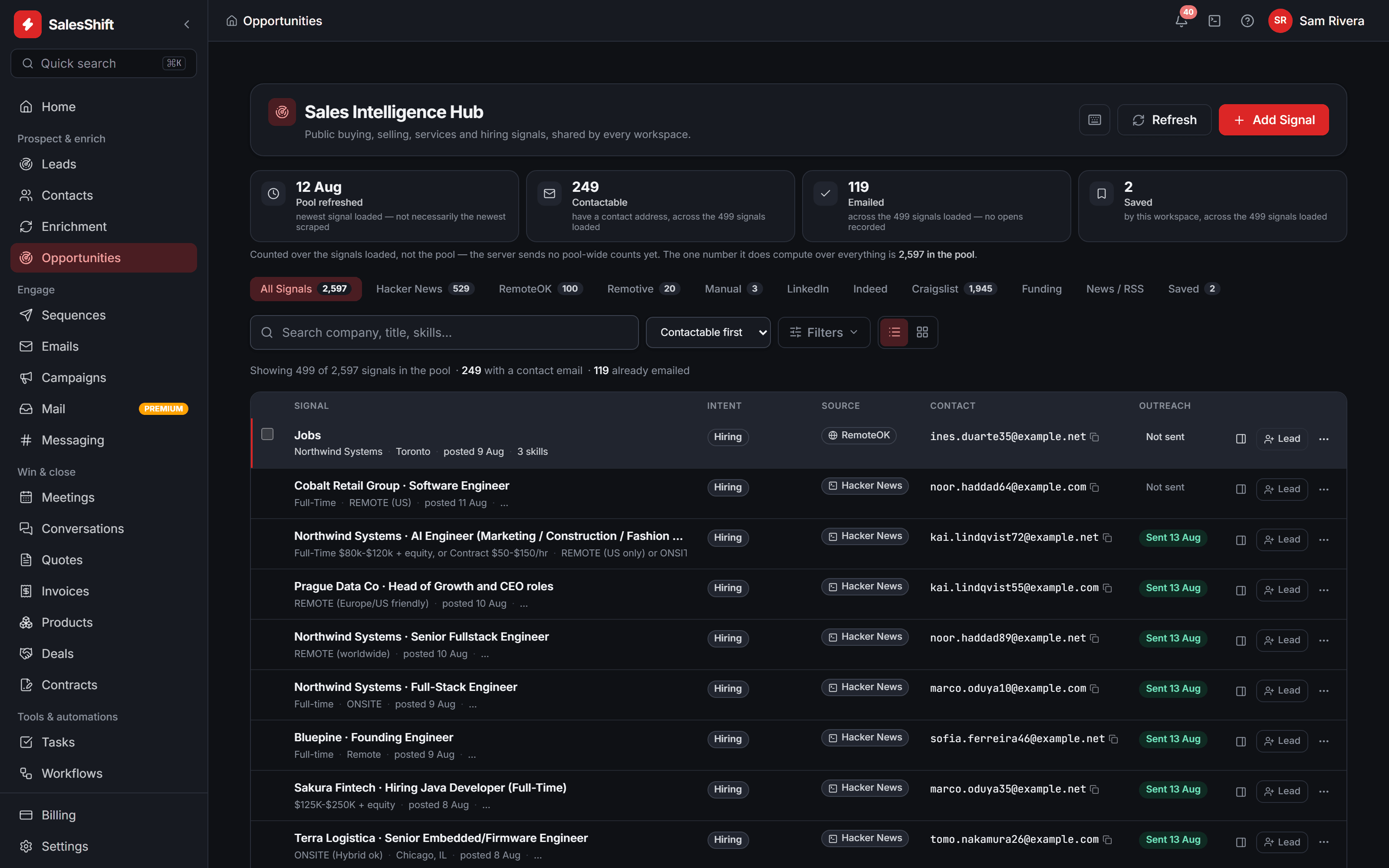
Work the ones worth working
The same feed as cards, for when you are judging rather than scanning. Each card carries its source, its intent and how much is actually known about it, then a piece of the posting itself, so you can tell a real buying moment from a keyword match without opening anything. The address is on the card, and one action turns the signal into a lead on your own CRM.
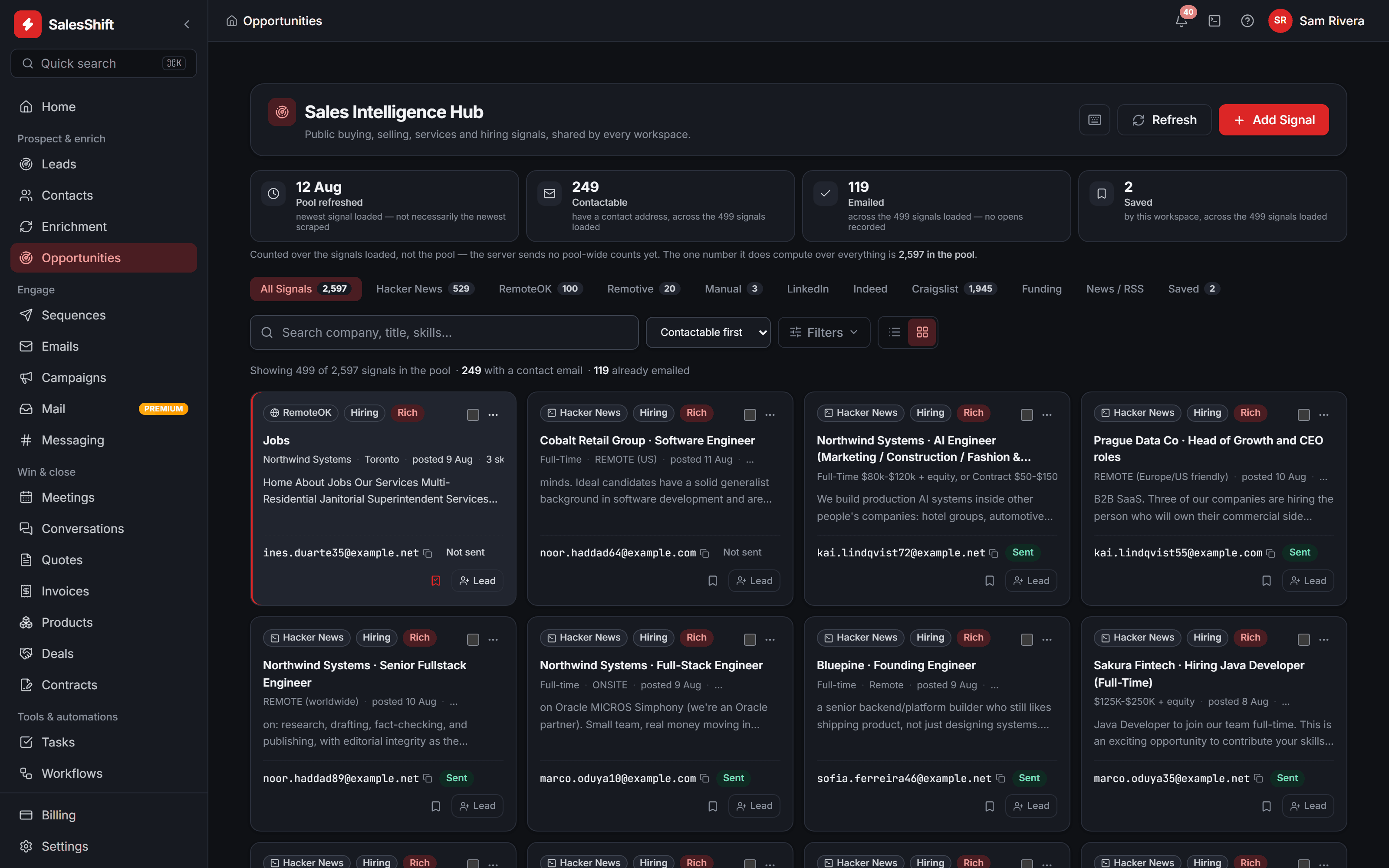
Reach them
Open the composer on a signal and the draft is already about that posting. Choose which mailbox it leaves from, edit the subject, and merge tags resolve against the CRM contact the send matches or creates. If your workspace has written to that address before, it says so before you press send — and caps and suppression are enforced on the server, not in this dialog.
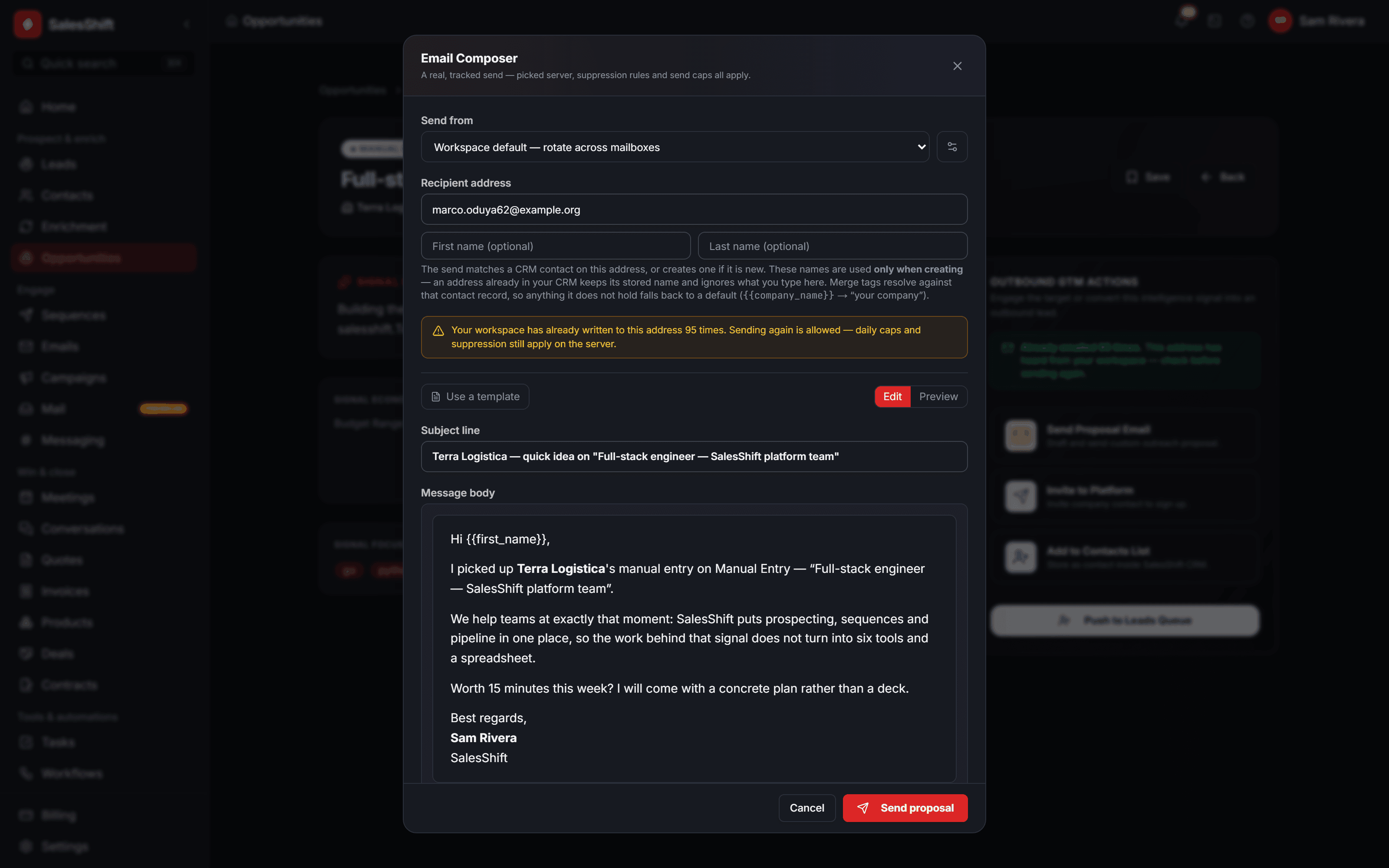
Three captures of the running application at /opportunities. The figures on them belong to a demo workspace and move between captures. On a narrow screen each one shows a region of its capture rather than the whole screen.
Pricing
Starts at $14 per user. You only pay more when you send more.
Every plan is the whole platform — the pipeline, the sequences, the prospect pool, the meetings, the invoicing and the AI assistant. What changes between them is volume. The servers, the sending infrastructure, the data and the models are ours and they are in the price, so there is nothing to assemble and no second vendor to sign up with before the first email goes out.
Per user, per month · 7 days of Starter free · no credit card
Starter
A founder or a first sales hire running the whole motion alone.
per month
7 days free · no credit card
- Emails sent
- 5,000 / mo
- Prospect reveals
- 1,000 / mo
- AI credits
- 500 / mo
Everything to run a full cycle
- Pipeline, contacts, tasks and activity history
- Prospect search, enrichment and verified reveals
- Sequences, campaigns and reply detection
- Meetings, quotes, e-signature and invoicing
- Managed sending on our infrastructure
- Deliverability grading and per-mailbox caps
Professional
Most teamsA team that has found the motion and now needs it to run without them.
per month
Billed monthly · cancel anytime
- Emails sent
- 25,000 / mo
- Prospect reveals
- 5,000 / mo
- AI credits
- 2,500 / mo
Everything in Starter, and
- Workflow automation across the whole record
- A/B variants per step, weighted and sticky per enrollment
- Inbox rotation across the pool, capped and scored per mailbox
- Calls with recording
- REST API, webhooks, vxcli and the five SDKs
Organization
A revenue org where mail volume, data residency and access control are somebody's job.
per month
Billed monthly · cancel anytime
- Emails sent
- Unlimited
- Prospect reveals
- 20,000 / mo
- AI credits
- 10,000 / mo
Everything in Professional, and
- Dedicated infrastructure on VxCloud, region of your choice
- No monthly send cap — volume limited only by daily sending guardrails
- Unlimited sending identities and stored contacts
- Workspace roles, permissions and activity trail
- Priority routing on the VxCloud help desk
- Migration and onboarding run with your team
Try Starter first
7 days, freeSeven days of Starter, in full. No card, no setup, nothing to install.
required
What you do not have to do
- Nothing to install
- It runs on our infrastructure from the first minute
- No card
- There is nothing on file, so nothing renews and nothing is charged
- Your own domain
- Connect a mailbox and send as yourself, not from a shared subdomain
Not a demo, and not a cut-down edition
It is Starter — the same application, the same meters, the same numbers a paying Starter customer gets. Nothing is greyed out, no feature stops working on day four, and there is no sales call between you and the product.
When the 7 days are up, sending and the assistant pause and everything you built stays exactly where it is — your contacts, your sequences, your pipeline and your history. Continue on Starter at $14, or pick a larger plan; do nothing and you are not charged, because there was never a card.
Included for the 7 days
- The whole CRM — pipeline, contacts, tasks, activity history
- Sequences, campaigns, reply detection and the shared inbox
- Quotes, invoices, contracts and e-signature
- 1,000 verified prospect reveals from the shared pool
- 5,000 emails through our managed sending
- 500 AI credits for drafting, rewriting and replies
Need more volume than Organization, or an air-gapped deployment? Talk to VxCloud
If you go past your plan
Four things cost us money and those are the four we meter. Everything else in the product is software, and software does not get cheaper by being rationed — so nothing else has a counter on it.
- Emails sent
- $1.00per 1,000 beyond your plan
- Prospect reveals
- $2.00per 100 beyond your plan
- Outbound call minutes
- $0.02per minute
- Additional node
- $10.00per node, per month
Nothing stops when you cross a line. You are told, the overage is on the next invoice, and a campaign never dies mid-send over a quota.
AI credits
One credit is one request to the assistant — a draft, a rewrite, a reply suggestion, a summary. Your plan includes a monthly allowance and it pools across the whole workspace. Need more in a heavy month? Add a pack.
- 1,000 credits
- $101.0¢ each
- 5,000 credits
- $450.9¢ each
- 10,000 credits
- $800.8¢ each
Packs never expire. Your monthly allowance is spent first, so a pack you bought in March is still there in June.
What the price covers
We are the provider, not the wrapper.
Every plan lands on infrastructure VxCloud operates. The relay the mail leaves from, the pool the prospects come out of, the models behind the assistant and the machines underneath all three are ours, so you are not asked to open four vendor accounts before the first email goes out, and you are not paying us to forward a bill somebody else wrote.
Any of them can be swapped for your own account — your SMTP server, your enrichment key, your model key. That is an option about control, available on every plan, and it changes what you run rather than what you pay.
Sending
included
Managed relay, IMAP sync and reply detection, run and monitored by us
Or connect your own SMTP server, SendGrid or Mailgun
Data
included
The prospect pool, enrichment and verification, metered as reveals
Or connect your own enrichment key
AI
included
The assistant, metered in credits — nothing to configure and no model account to open
Or connect your own model key and use it instead
Infrastructure
included
Servers, storage, backups and region on VxCloud — nothing for you to run
Or take a dedicated node on Organization
Our margin on a provider you connect yourself: none.
Compare
Line by line.
Volumes are per user, per month, and pool across the workspace. The trial is Starter for 7days, so its figures are Starter's — as totals for the week rather than per month.
The trial is Starter, in full, for 7 days — not a cut-down edition and not a different set of limits. Professional and Organization are chosen rather than trialled: start on Starter and move up whenever the volume says so.
Rows we deliberately do not print: uptime percentages, compliance certifications and anyone else's prices. Two of those we have not earned yet, and the third is not ours to publish.
Questions
Before you ask.
And if it isn't here, it is in the documentation — or in the product. Create an account and look.
We do, with one exception we would rather name than bury. SalesShift is a VxCloud product, and VxCloud is an infrastructure company — the servers, the storage and the SMTP relay are ours, operated by us, and included in the plan price. The prospect data is ours too, metered as reveals. You do not open a vendor account to send the first email, and you do not open one to use the AI either — the assistant runs on our infrastructure and is metered in credits, the same way reveals are.
Yes, on any plan, and it is an option rather than the price of admission. You can point mail at your own SMTP server, SendGrid or Mailgun, enrichment at your own provider, and the assistant at your own model key. When you connect one, that provider bills you directly at their price, we add no margin, and the usage stops drawing on your plan allowance — connected model keys spend no AI credits at all. Nothing here requires it: out of the box we run all four and there is nothing for you to set up.
Three plans, priced per user, per month: Starter at $14, Professional at $39 and Organization at $89. Every plan carries the whole platform — pipeline, prospecting, sequences, meetings, contracts, invoicing and the AI assistant — and what separates them is volume. Go past what your plan includes and the extra is metered rather than blocked: $1 per 1,000 emails, $2 per 100 prospect reveals, 2¢ a call minute and $10 a month for an additional node. Every plan starts with a 7-day free trial and no credit card.
The whole platform for 7 days, on our infrastructure, with no credit card. Nothing is greyed out and no feature stops working partway through — the only difference is the size of the meters: 2,000 emails through our managed sending, 500 verified prospect reveals, 200 AI credits, 2 sending identities and up to 3 people. Those are totals for the week rather than monthly allowances, and they are sized to answer whether this works for you rather than to run a quarter on.
Nothing is deleted and nothing is charged. There was never a card on file, so there is no renewal to cancel and no invoice to dispute. Sending through our infrastructure, the prospect pool and the assistant pause; your contacts, sequences, deals, documents and history stay exactly where they are and stay readable. Pick a plan whenever you like — the day after, or a month later — and everything starts again from where it stopped. You can also export the lot and walk away.
Yes — when you connect your own mailbox or SMTP server, which every plan can do including the trial. The message then goes out authenticated as that mailbox, so your provider signs it, your domain is in the headers and your reputation is the one being built. Each connected mailbox is graded and capped separately, and reply detection reads the mailbox back over IMAP and stops the sequence. Our managed relay is the alternative when you would rather not run any of that — it sends on our infrastructure and our domain.
No — that is the point of the product. A quote becomes a document you send for signature with the fields placed where you want them, and the signed document becomes an invoice: line items with per-line discount and tax, a PDF, an emailed copy, and payments tracked against the balance — part payments included — until it clears. Quote, signature, invoice and payment history all stay on the same record.
Pricing is per user, per month, and so are the allowances — a second user on Professional brings another 25,000 sends, 5,000 reveals, 2,500 AI credits and ten more sending mailboxes with them. Everything pools across the workspace rather than being trapped per person, so one heavy sender and one light one balance out instead of one of them hitting a wall. If a particular month runs hot you can add a credit pack — 1,000 for $10, 5,000 for $45, 10,000 for $80 — and they never expire.
No. Nothing you write, send, store or generate is used as training data, by us or by anyone we work with, and your workspace is not readable by another tenant. Prompts and completions are not retained after the request that made them. Credentials you add are encrypted in Vault rather than written to the database. If your policy requires the text stay inside your own network, connect your own model key and the assistant uses that instead — on any plan, and it spends no credits when you do.
You export it. Contacts, threads, documents and invoices are all exportable and the sending domain was always yours to point elsewhere — so leaving costs you a migration, not your mail history or your customer relationships. Money never ran through us either: there is no platform balance to withdraw, because collection already happens in your own bank or processor and this is where it is recorded.
Every screenshot on this page was taken from the running application against a real workspace; the names in them were replaced, the numbers were not. The surfaces they show all exist today — the pipeline, sequences, the sending pool, the calendar, e-signature, invoicing and team messaging — as do three that are not pictured: prospecting, the mail client and the workflow engine. Integrations that are not wired end to end are shown as unavailable in settings rather than accepting a key we would never use.
Nothing to provision. Start sending.
Authenticate a domain, search the pool, and take one record all the way to a paid invoice — on infrastructure that is already running.